Wednesday, September 24, 2008

Izotope Ozone v.3.12. VST.RTAS.HDTM.MAS.AU + Preset

Ozone 3 includes all the tools you need to master the commercial sound in seconds. Professionally designed presets and the acclaimed Ozone Mastering Guide walk you step by step through making radio-ready masters.

The process of mastering ranges from correcting mistakes made in the mix to preparing a recording for target listening environments. Like a final coat of polish, mastering makes the difference between a good sounding mix and a professional sounding master. Ozone includes integrated tools for each step of the process: add broad equalization to balance the tone, multiband compression to control the dynamics, harmonic excitation to inject punch and sparkle, stereo imaging to sculpt the sound stage, loudness maximization to raise the level of the entire track to the standard for commercial use, and dither to maintain every last bit of quality. Since Ozone was designed to address the mastering process, all the components work together to help you put that final professional sound on a project. With Ozone 3, be prepared to love your sound.

Professionally Designed Presets
Ozone 3 ships with a wide array of presets for many mastering situations. Get immediate results by auditioning several presets to find the closest fit. Spend less time tweaking and more time producing. For more control, mix and match preset settings using the advanced preset manager. Visit the iZotope web site, and learn tricks of mastering from the presets and Mastering Guide.

7 Plug-ins in 1 Integrated Interface
Mastering requires a specific set of tools, and Ozone 3 has them all. Rather than a bundle of separate plug-ins, Ozone 3 is a single integrated system. This integration allows for a logical, optimized interface and superior sound quality not possible with a chain of independent plug-ins. With extensive metering, an integrated preset system, and full undo history, Ozone surpasses standard “plug-in” expectations to streamline workflow, save time, and keep you focused on creative work.

Analog Modeling
Ozone is the result of extensive research in analog modeling. Ozone provides compression, equalization, and harmonic excitation that recreate the behavior exhibited by analog equipment. Analog processing has certain nonlinear aspects that a mathematician would consider "wrong" but sound better musically. Any analog equalizer, for example, applies a small phase delay to the sound. These types of “imperfections” provide the analog characteristics of warmth, sparkle, depth, and an overall pleasing sound. Ozone captures the essence of analog gear to deliver sweet sounding masters.

Digital Precision
While analog modeling can provide a pleasant character or “colorization” to the sound, in some situations precise or “transparent” signal processing is desired. For example, you may wish to equalize or notch out a frequency without introducing the phase delay inherent in analog filters. For these applications, Ozone provides a digital, linear phase equalizer and crossover for a level of surgical precision not possible in analog hardware.

64-bit Audio Processing
When processing audio, Ozone can perform thousands of calculations on a single sample. In a digital system, each of these calculations has a finite accuracy, limited by the number of bits used in the calculation. To avoid rounding errors from interfering with the audible portion of the audio, Ozone performs each calculation using 64 bits. Can you hear 64 bits? No, but that’s the point. The rounding errors (inherent not just in Ozone but in any digital system) are pushed down into the inaudible range with Ozone.

Usability Enhancements: Undo and History
Ever have a late night recording session only to wake up in the morning with a tinny, horrible-sounding master? Audio fatigue is a real problem, and in this situation you would have to scrap the work and re-master the track. Ozone 3 addresses this problem with the ability to undo any and all parameter changes – even between sessions! As you tweak controls, each movement is captured and displayed in the History list. To hear a previous setting, simply click up the list to the point you want to audition. When working with mastering effects, perhaps most notably EQ and dynamics, it’s very easy to get accustomed to the “new” sound and overdo the effect. The History list lets you quickly jump back for comparisons to refresh your “auditory memory”.

Download Application Click Link Below

Download Here

Download Preset Click Link Below

AndreDrums.zip
BloodHound_Ozone_Presets.zip
CraigBraden.zip
DevonB.zip
GeorgePresets.zip
GregPresets.zip
Huston_Presets.zip
MJPresets.zip
Ozone_Gill.ZIP
samuelpresets.zip
WLOzone.zip

MIX IN KEY 3.1

How Does It Work?

Mixed In Key is easy to use. Simply add your music to the Analyze Songs window, click Start Processing and Mixed In Key will show you which songs mix together without a key clash. Using the results will give you a harmonic mix every time.

You can use Mixed In Key to create amazing DJ sets. Thousands of our DJs use Mixed In Key results with CDs, Ableton Live, Traktor and other DJ software.

Shows a screenshot of Windows Version

(Mixed In Key scans your MP3 and WAV files and shows you which songs are harmonically-compatible)


How to Register MIK 3

1. Kill your internet connection
2. Put 7PD035213G708170F to the VIP Code
3. Complete form with your name, email and country
4. Close MIK 3 Application
5.Connect to the internet
6. Open MIK3 application
7. you will get "Thanks for chossing MIK 3.1


Download Here

Wednesday, September 17, 2008

STYLUS RMX Expander

Stylus RMX Library - Funk Bass
Funk.Bass.part1.rar
Funk.Bass.part2.rar

Stylus RMX Library - Funk Construction
Funk.Construction.rar

Stylus RMX Library - Funk Guitar
Funk.Guitar.part1.rar
Funk.Guitar.part2.rar

Stylus RMX Library - Rhythm Guitar FX
Rhythm.Guitar._.FX.part1.rar
Rhythm.Guitar._.FX.part2.rar

Stylus RMX Library - Return To Planet Of The Break
Return.To.Planet.Of.The.Breaks.rar

Stylus RMX Library - Pure Mayhem
Pure.Mayhem.part1.rar
Pure.Mayhem.part2.rar
Pure.Mayhem.part3.rar

Stylus RMX Library - Junkyard
M-Audio.Junkyard.part1.rar
M-Audio.Junkyard.part2.rar
M-Audio.Junkyard.part3.rar
M-Audio.Junkyard.part4.rar

Stylus RMX Library - Funky Beats
M-Audio.Funky.Beats.part1.rar
M-Audio.Funky.Beats.part2.rar
M-Audio.Funky.Beats.part3.rar

Stylus RMX Library - Guitar Odyssey
Guitar.Odyssey.part1.rar
Guitar.Odyssey.part2.rar
Guitar.Odyssey.part3.rar

Stylus RMX Library - GRINDING BEATS
Grinding.Beats.part1.rar
Grinding.Beats.part3.rar
Grinding.Beats.part2.rar


Stylus RMX Library - One Big World

Stylus RMX Library - Late Nite
Stylus RMX Library - Rice & Beans
Stylus RMX Library - Drum Styles (ZeroG)
Stylus RMX Library - Ambient Alchemy


Upload Still in Progress !!!......be patient please

Thursday, September 11, 2008

Pure Trip Hop - RMX Expander

This is STYLUS RMX Expander


Download Here

Sound Order Albino 3 Sound Set

This is Audio Preset for Albino 3....the best

Soundorder.com.Albino.3.SoundSet-AMPLiFY.rar

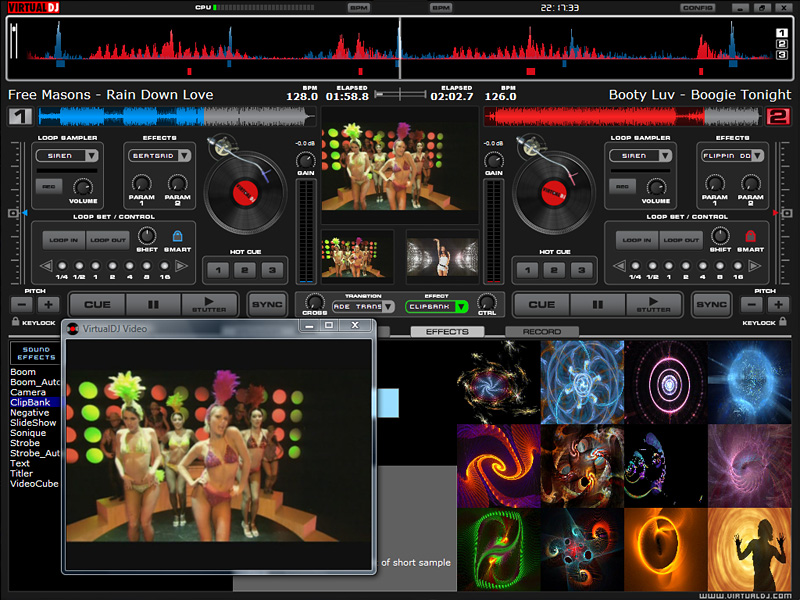
Virtual DJ Pro 5.2 + SN


VirtualDJ PRO - Video Mixing


VirtualDJ
is the hottest MP3 mixing software, targeting every DJ from bedroom DJs to professional superstars like Carl Cox.
With its breakthrough BeatLock engine, your songs will always stay in the beat, and you can work your mixes incredibly faster than any other DJ could.

The automatic seamless loop engine and the brand new synchronised sampler will let you perform astounding remixes live, with no preparation at all.
The visual representation and the cues allow you to clearly see the song's structure, and never be surprised by a break anymore.
The vinyl controls will let you scratch like on a real turntable, except that with the beatlock engine your scratches will never end out of the beat.

Add to that an infinite number of cue points you can save for each songs, a bunch of wonderful effects automatically beat-synchronised.

Add also several interfaces to suit everybody from the beginner to the professional DJ, the possibility to record your mixes to burn them on CDs, to broadcast on the Internet and have your own radio station, to save your CDs directly in MP3, to use a headphone to preview the songs or an external mixtable to perform in a club.

Lastly, enter the new era of DJs by mixing video clips (DVD, DivX, MPEG...) which you can send on a giant screen.

Virtual DJ brings you all that, in the most easy-to-use way, and at the most affordable price.

Download Here


Camel Audio Biolabs massive Sound


Biolabs Massive Sounds released

Camel Audio are pleased to announce the release of Biolabs Massive Sounds for Native Instruments Massive.

Biolabs Massive Retaliations is an eclectic collection of 200 highly useable and flexible patches designed by Biomechanoid, a sound designer for various Hollywood movies and games. The sounds cover the full spectrum of possibilities offered by Massive - including earthshaking basses, epic pads, biting leads, pulsating rhythms, crazy effects and evolving atmospheres. The presets are suited to a wide variety of styles from ambient and drum and bass to electronica and soundtrack.

The sounds are designed to be as usable as possible whilst retaining an experimental and innovative edge. They also take full advantage of NI's browser and attribute system, making it quick and easy to find and audition the sounds you require. Each patch features a full compliment of macro controls, together with other modulators such as velocity and aftertouch, making every sound highly expressive and tweakable. An innovative collection of 200 presets for Massive

Biolabs Massive Retaliations is an eclectic collection of 200 highly useable and flexible patches designed by Biomechanoid, who has designed sounds for various Hollywood movies and games.

The sounds cover the full spectrum of possibilities offered by Massive - including earthshaking basses, epic pads, biting leads, pulsating rhythms, crazy effects and evolving atmospheres. The presets are suited to a wide variety of styles from ambient and drum and bass to electronica and soundtrack.
Massive Sounds

The sounds are designed to be as usable as possible whilst retaining an experimental and innovative edge. They also take full advantage of NI's browser and attribute system, making it quick and easy to find and audition the sounds you require. Each patch features a full compliment of macro controls, together with other modulators such as velocity and aftertouch, making every sound highly expressive and tweakable. Biolabs Massive Sounds also comes with a detailed manual.

System requirements:
Native Instruments Massive 1.1 or higher.

Download Here

Wednesday, September 3, 2008

Monday, September 1, 2008

V Station

V-Station

Virtual Analog Synthesiser based on the K-Station
V-Station Main - Media Banner


EASY TO USE, POWERFUL IN OPERATION
And getting the best from the new V-Station is easy. All the primary sound-shaping controls are there on the main screen - clear, concise and refreshingly simple. Recall a named factory preset, tweak it to get ‘your sound’ and instantly save it in any of the 400 program locations. Need more? Just click and you’ll find additional functions and controls on the other three screens.

THE ULTIMATE K-STATION/A-STATION PARTNER
For ultimate flexibility, why not partner a V-Station with one of Novation’s award-winning hardware synths? As sounds created in the V-Station can be downloaded into the K-Station and vice versa, harmonising your gigging/studio set-ups and building mega-sound libraries is snap.

ANALOG MODELLED OSCILLATORS
Three powerful oscillators provide all the classic waveforms, including a sine wave for those sub-bass floor-shaking grooves. All waveforms feature a “Double” facility which provides twin waveforms with no loss of polyphony. Oscillators may be set to Unison or Synced operation and can utilise FM for the generation of metallic or percussive timbres. A noise source is also included in the waveform engine.

NOVATION WARM LIQUID FILTERS
Delivering the rich liquid sound of an analogue filter. Selectable low-pass, 12dB or 24dB cut-off curves with resonance and overdrive make it easy to recreate anything from a distorted TB303 to tight, rounded bass patch.

UNLIMITED MULTI-TIMBRAL PARTS
The V-Station delivers eight voices for each instance that is used. Call up an instance of the V-Station and there are immediately a further eight voices available with a new sound if desired. This ability to use multiple ‘instances’ allows the V-Station to run as many multi-timbral parts as the power of the host computer will allow.

INTEGRATED EFFECTS ON EACH INSTANCE
Novation set the industry standard with the famed Supernova synthesizer for providing a complete set of powerful effects on each part on the multi-timbral synthesizer. The V-Station adopts this sound structure which makes for six simultaneous effects per instance. The effects include a distortion unit that adds edge for harder sounds, a synchronised stereo chorus or phaser for spatial effects and a reverb that adds an extra dimension of realism. A synchronised panner and the delay engine complete the comprehensive line-up.

ARPEGGIATE, TWEAK AND SYNC TO THE BEAT
An arpeggiator with programmable speed, synchronisation and sweep range is available within each instance. Comprehensive synchronisation of time-based effects can be easily implemented. For example the delay effect may be set to a quarter note repeat whilst another LFO (built in to the effects unit) can sweep the phaser every two bars. All parameters respond to MIDI controllers which can be recorded in realtime on a track on the selected sequencer - set up a few instances, hit a single key and trigger a wall of sound. All running arpeggiators and LFOs can be individually synchronised to MIDI clock in different time signatures.